Published by PutTogether, which makes one of the six apps below. No affiliate links. Every app was tested on iOS 26 in May 2026 against an 84-piece reference wardrobe, with Pixel 9 notes for the four that ship on Android.
Scope: the visual and avatar axis only. The two avatar apps are compared head-to-head, including who pays and what each asks you to upload, in Alta vs PutTogether. The full ten-app field map is Every Digital Closet App in 2026, Ranked.
Closet apps spent fifteen years arguing about catalog logic — cleaner garment grids, smarter color tagging, faster background removal. The argument they had not spent much time on is what should the user see when they open the app today?
The default answer in the category is a flat-lay: your jeans on a soft cream background, your jacket above them, your shoes below. You mentally translate that arrangement into a person wearing it. That worked until 2025, when Alta began generating an actual avatar of the user. PutTogether followed in 2026. The category quietly split.
How we scored
Four criteria, each scored 0 to 10. Same 84-piece test wardrobe across all six apps, May 2026. We ran each app's onboarding three times to smooth first-pass learning, then used the app daily for two weeks.
- Visual approach. Does the app show garments laid flat (catalog), the user's own photos (DIY), a photo-real generated avatar, or an illustrated portrait?
- Personalization. Does the visual look like the specific user, or is it a generic mannequin every user shares?
- Outfit assembly. Does the visual update when pieces swap, or is it a static onboarding render?
- Onboarding moment. Does the visual hook arrive within the first 90 seconds of opening the app?
What we couldn't test: Alta's seasonal "trip planner" feature was new in v2.1 and we only ran it once. We did not test enterprise or styling-professional accounts on any app.
The 2026 scoreboard
Alphabetical to avoid implying a single overall winner; the question is which axis matters to the reader.
| App | Visual Approach | Personalized | Updates With Outfit | Onboarding Hook |
|---|---|---|---|---|
 Acloset Acloset | Flat garment grid | No avatar | n/a | Slow |
 Alta Alta | Photo-real generated avatar | Resembles you (photo input) | Yes, on each look | Yes, ~60 seconds |
 Cladwell Cladwell | Outfit card with flat pieces | No avatar | n/a | Functional |
 PutTogether PutTogether | Illustrated mini-you | Resembles you (illustrated) | Yes, on each swap | Yes, free before the paywall |
 Stylebook Stylebook | User's own photos | Your own photos | Manual | None (DIY) |
 Whering Whering | Flat-lay outfits | No avatar | n/a | Analytics-led |
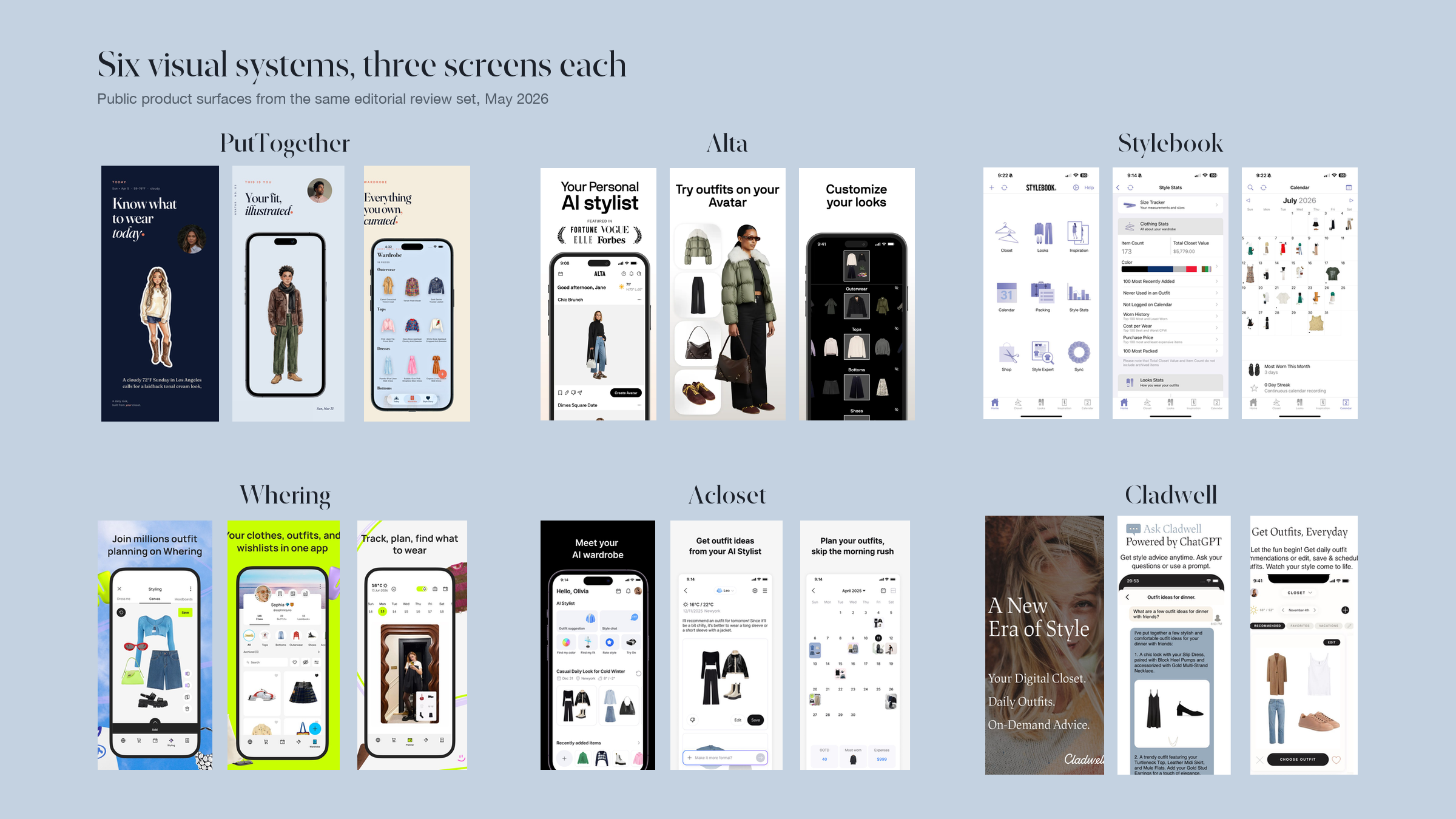
A flat grid is a catalog. An avatar is a page from a magazine that features you. The first asks you to make a decision about clothes; the second asks you to see yourself. In 2026, two apps have picked the second answer — they just disagree about whether the picture should be a photo or a drawing.
A likeness, or an interpretation
The photo-versus-drawing split is not cosmetic, and it decides two things before you have chosen an outfit.
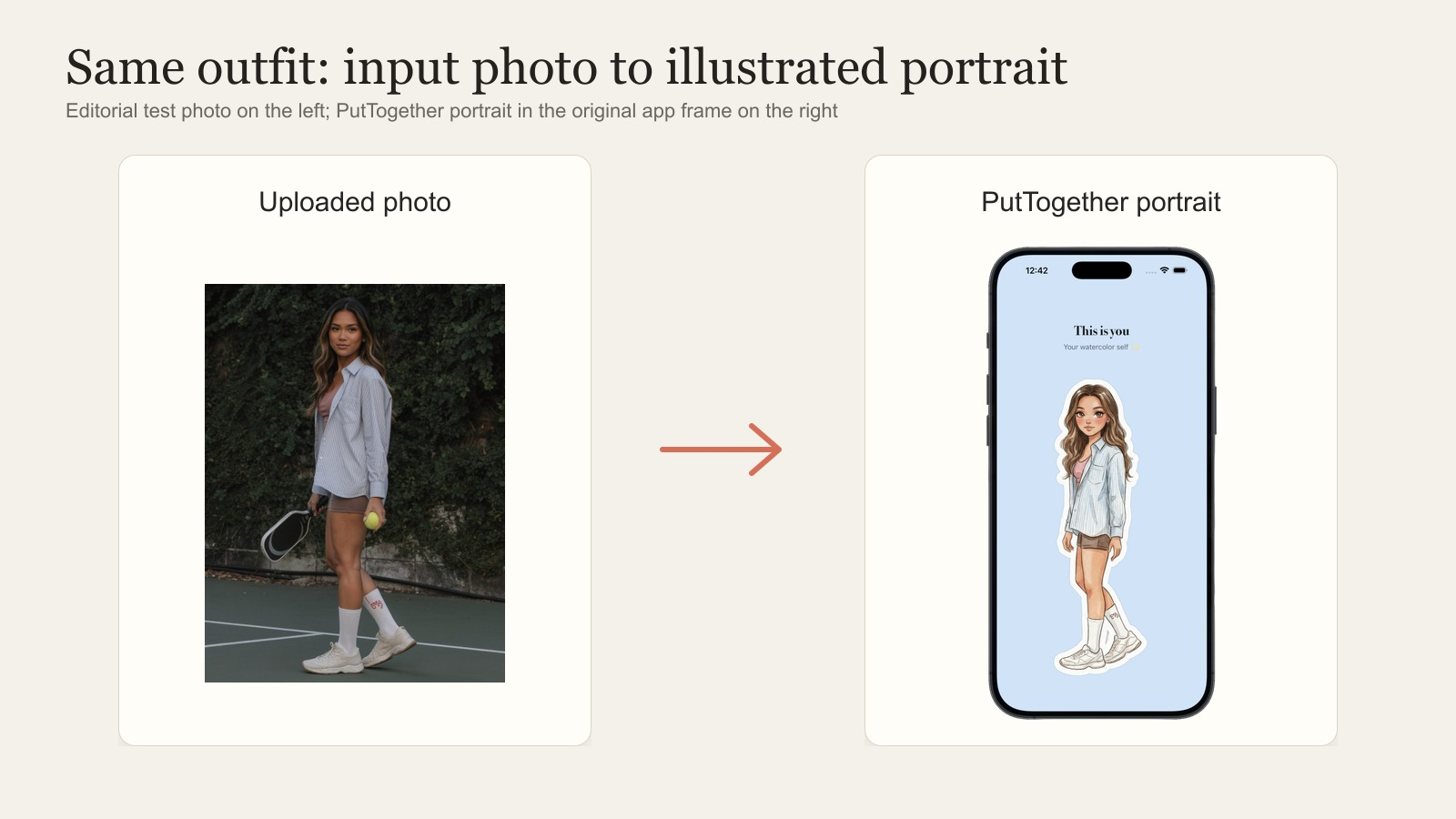
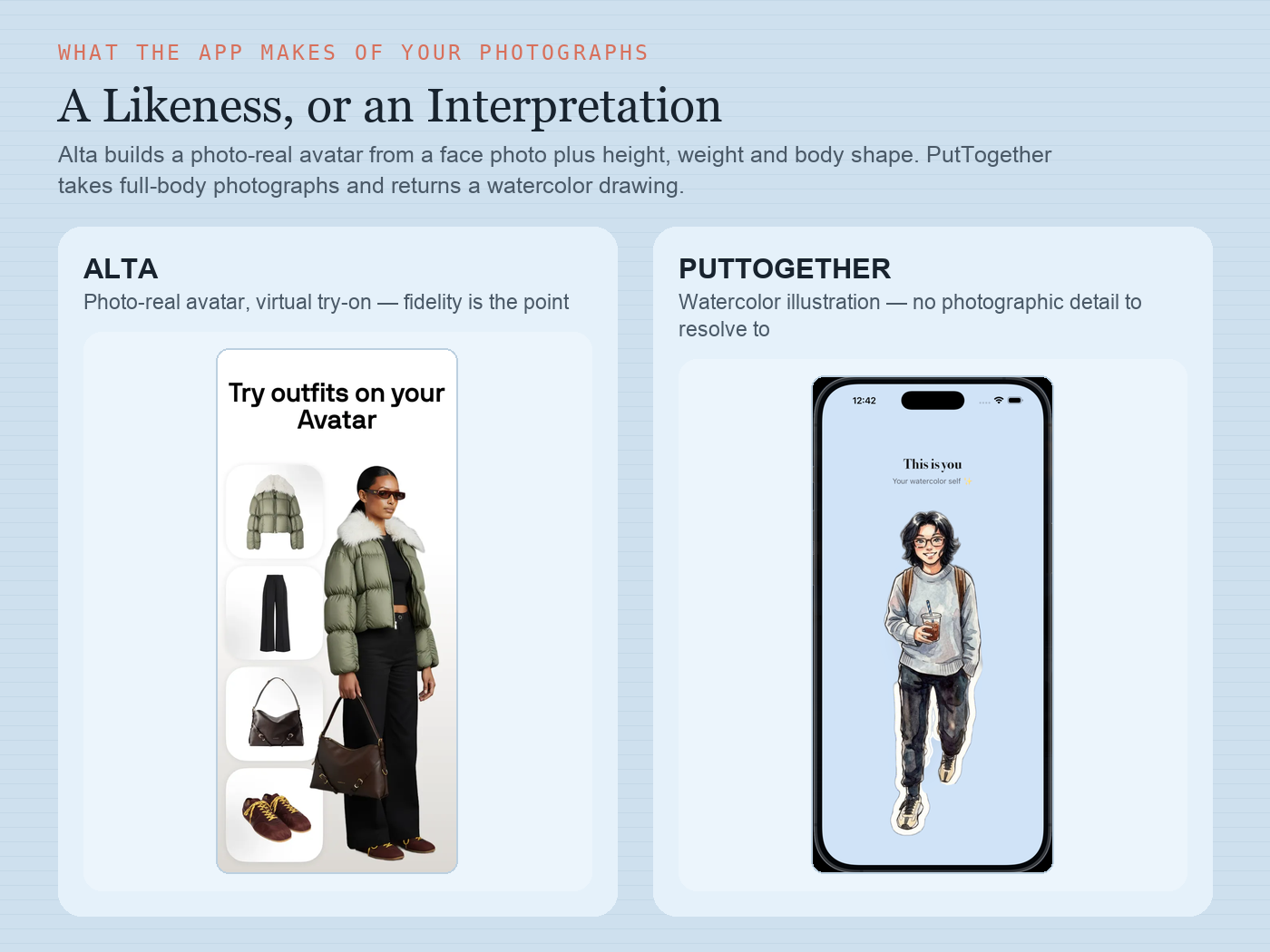
The first is what you have to hand over. A likeness needs a face photo plus height, weight and body shape, because a try-on that does not resemble your body has not done its job; that is what Alta asks for. A drawing needs one full-body photo, because proportions, colouring and the way you stand come from the picture and nothing else; that is all PutTogether asks, and there is no gender, size, height or weight field anywhere in it.
The second is what happens when you want to post it. Closet apps want you to share, because that is how a wardrobe app grows without a marketing budget. If the app has built a photo-real render of your body, sharing an outfit means publishing an image of your body in clothes that was generated rather than photographed. Plenty of people will do that happily. Plenty will open the share sheet, think for a second, and close it. A watercolor removes the hesitation: it has no photographic detail to zoom into, so you can post yourself in a coat to a group chat without deciding how you feel about your body that day.
The cost runs the other way too. A drawing will not tell you whether trousers fit. If the question is "does this sit right on me," the likeness is the right tool and Alta is the better app for it.
The apps, one by one
PutTogether
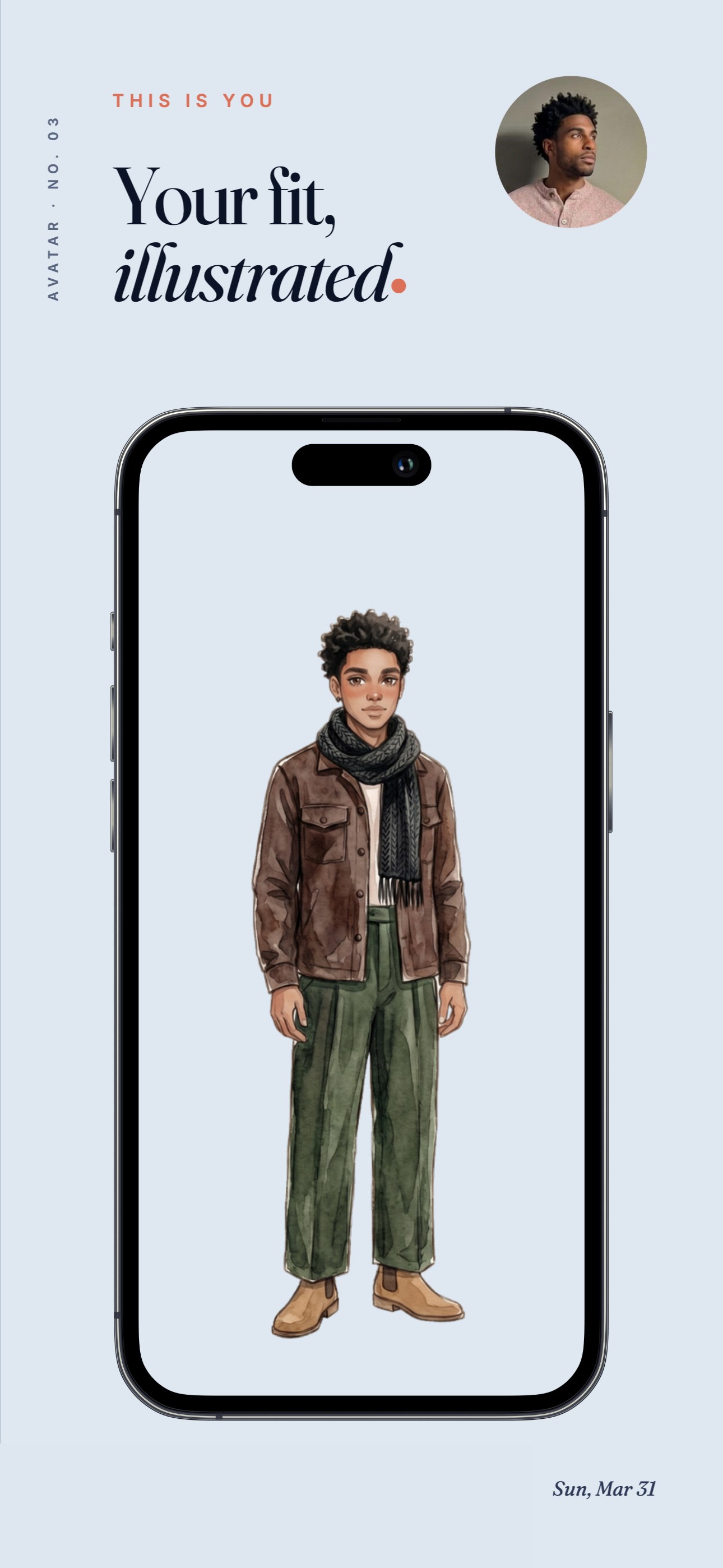
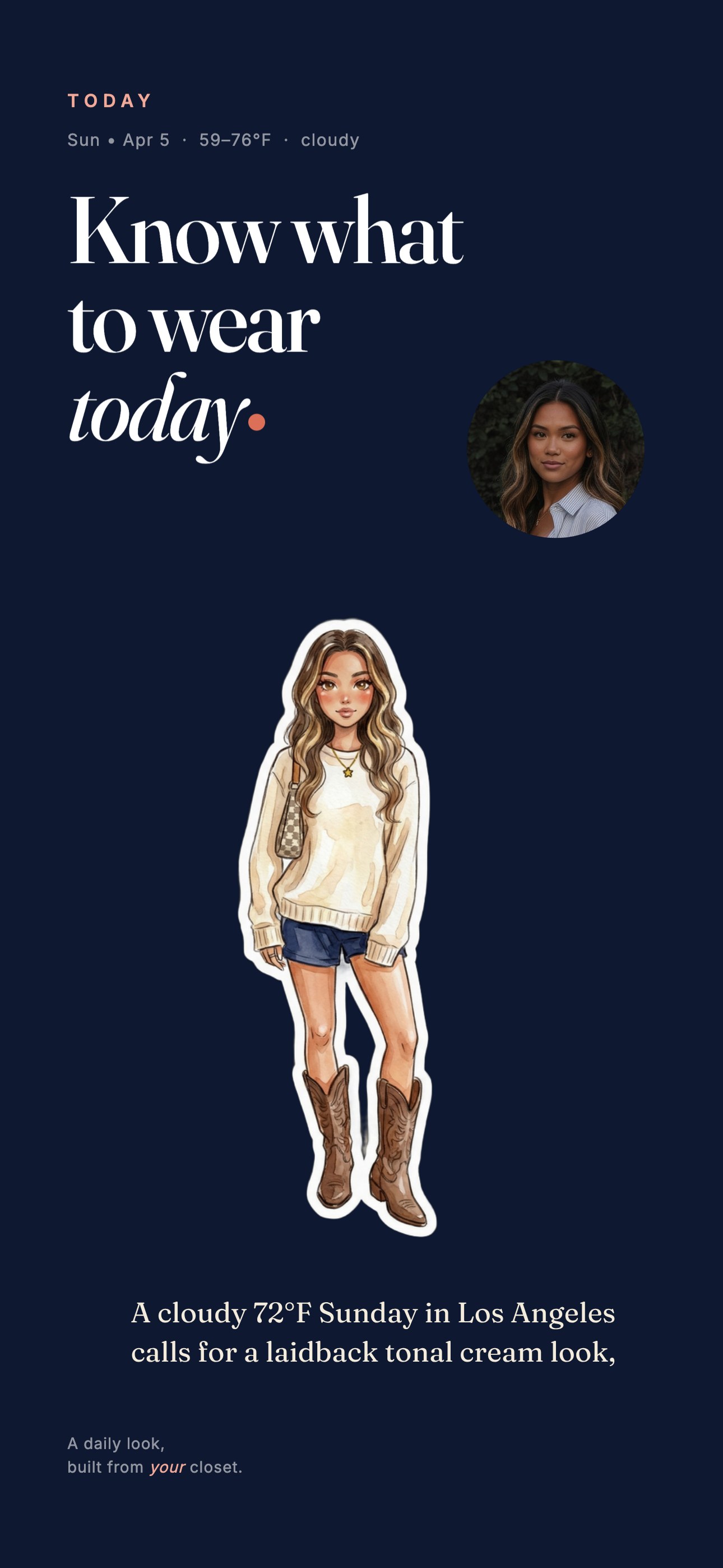
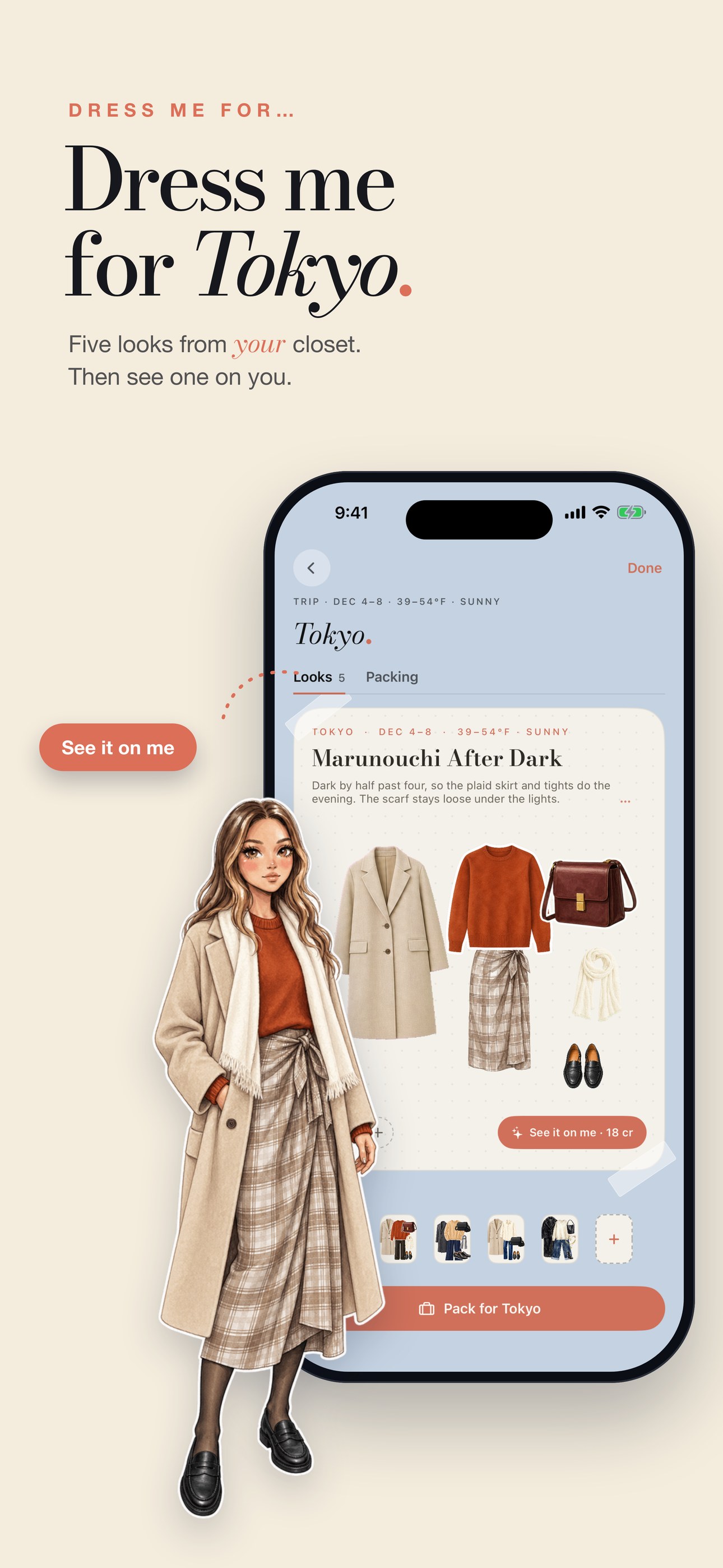
PutTogether is the publisher of this article. With that on the table: the visual that distinguishes it on this axis is an illustrated mini-you of the user, drawn during onboarding from a single uploaded outfit photo. The face leans anime (large eyes, clean line work); the clothes carry the watercolor texture the in-house design team developed alongside the generation model. Your first mini-you is free; for members it redraws in each daily look and any Dress me look.
The argument for an illustration rather than a photo, as the team has framed it internally, is that fashion illustrators have always sidestepped the uncanny valley: capture the energy and silhouette, suggest the fabric, don't render every buckle. That is the bet PutTogether made; Alta made the opposite bet, and both bets are coherent.
Where it falls short: iOS only — Alta or Whering are the Android answers. Your first mini-you is free, drawn from one photo, and so is Dress me; the daily look and seeing Dress me looks on your mini-you need a plan, from $9.99/mo for 25 pieces. Alta is free. No retail integration — if the user wants the avatar to also surface things to buy, Alta is the answer. A blurred or cropped first photo gives a soft first portrait; the upload sheet's four photo cards show what works. Stylebook, which uses your own mirror photos, skips that step.
Best app on this list for: users who want an editorial illustration of themselves in the outfit and would rather not pursue agentic shopping.
Alta
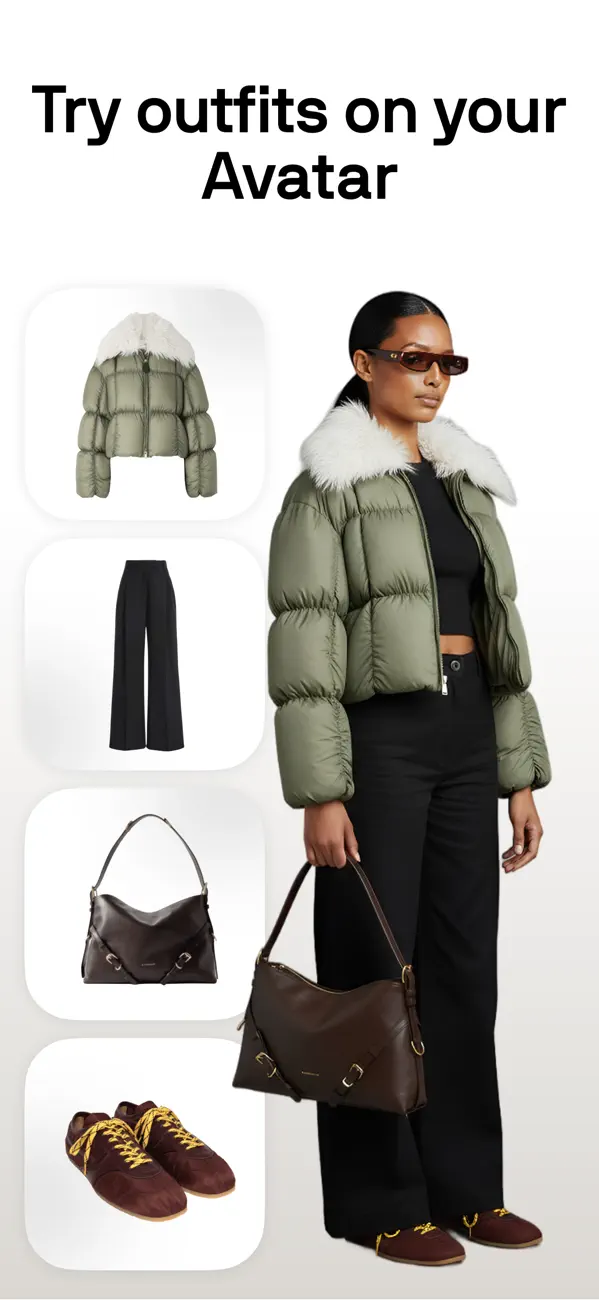
Alta is the photo-real answer to the avatar question. Founder Jenny Wang (28 at the time of the June 2025 raise, Harvard engineering, ex-DoorDash) raised an $11M seed in June 2025 led by Menlo Ventures, with Anthropic's Anthology fund, LVMH-linked Aglaé Ventures, and angels including Karlie Kloss and Jenny Fleiss (TechCrunch, June 16 2025). The app is free.
The visual approach: a personalized avatar built from a face photo plus height, weight, and body shape inputs, with outfits rendered as virtual try-on on that avatar. The system was trained with longtime stylist Meredith Koop, best known for dressing Michelle Obama, and ships with a CFDA partnership giving Alta access to ~370 American designers' inventory (WWD, April 2025).
Where it scored: Top on photo-realism, top on retail integration (~4,000 brand partners), top on price (it's free). Notable shortcomings honest reviewers have flagged include weak hot-weather styling logic, slow navigation between saved looks, an eight-piece-per-look cap on the avatar, and a wishlist scattered across tabs (Style With In Grace, hands-on review, 16 March 2026: "I'm convinced Alta still has absolutely no idea how to dress someone for hot weather," and "The closet navigation is probably the biggest ongoing pain point"). The agentic shopping loop is the differentiator; if the user is primarily trying to wear what they already own rather than discover new pieces, the loop pulls in a direction they may not want.
Best app on this list for: users who want a photo-real try-on and don't mind that the product is built around a shopping recommendation, not pure closet management.
Stylebook
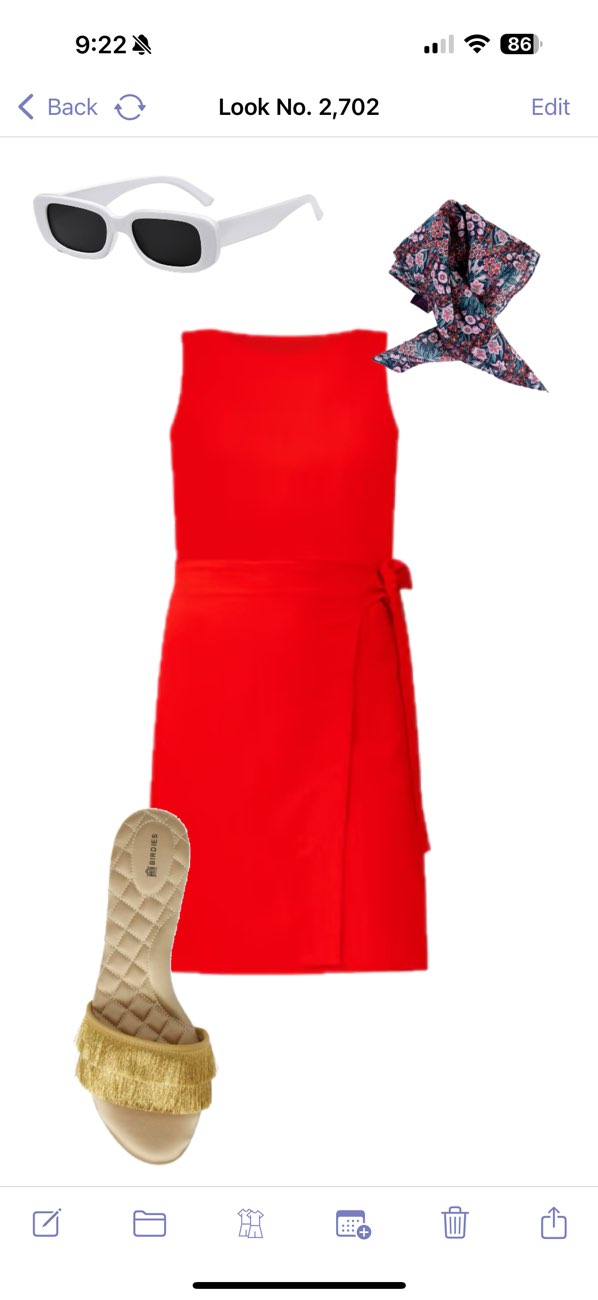
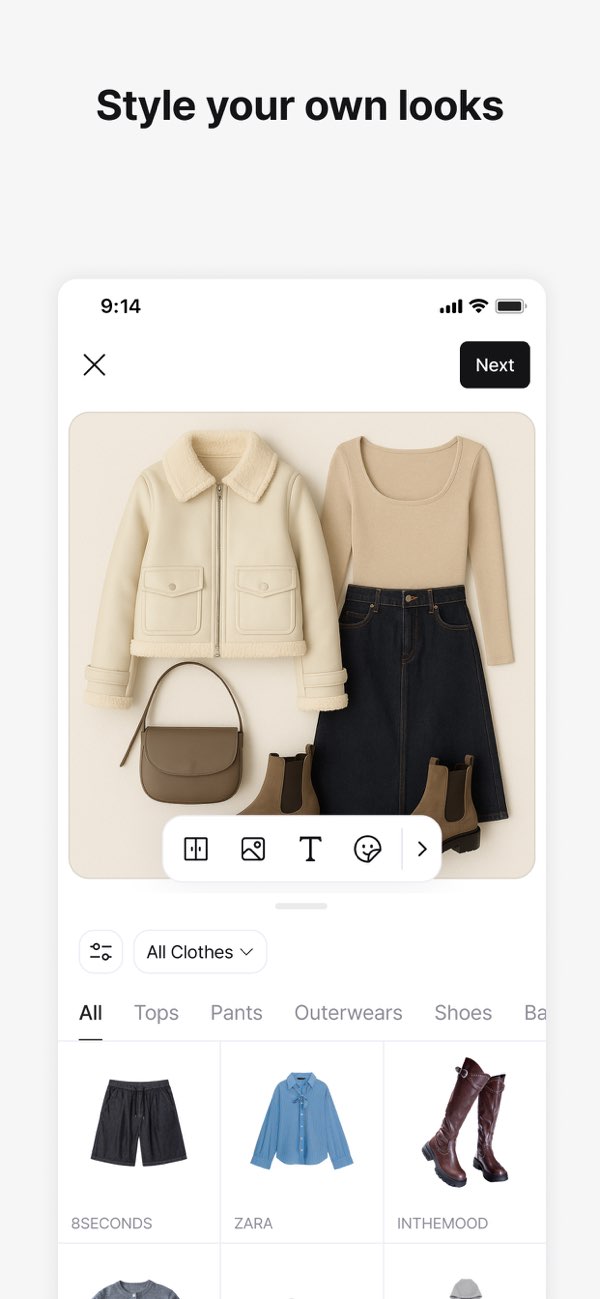
Stylebook gives you the most personal visual on this list, with the most labor attached: you take your own outfit photos in the mirror, the app catalogs them, and you scroll through your archive like a personal lookbook. There is no avatar to update because Stylebook does not draw anything; it inventories what you have already worn.
Stylebook's co-founders Jess Atkins (who started in the fashion closets at Vogue and Modern Bride) and Bill Atkins have framed the product as a deliberate choice for over 15 years: the app gives you tools to catalog and plan, not opinions about what to wear. For users who like seeing themselves in clothes they actually wore, Stylebook is the right answer; for users who want to see themselves in combinations they have not tried, the app cannot picture it: its outfit generator shuffles your closet into new combinations, but nothing draws you wearing them.
Best app on this list for: users who treat the closet app as a diary, not an oracle.
Whering
Whering ships the best flat-lay in the field, full stop. The London team art-directs every screen with the discipline of a magazine: off-white backgrounds, editorial composition, considered spacing. CEO Bianca Rangecroft (ex-Goldman Sachs) has publicly described Whering as a Clueless-inspired digital wardrobe (The Modems interview), and the screens carry that frame visibly.
What Whering does not do is put you in the outfit. The flat-lay is a styling proposal; the user is still imagining themselves in it. The choice is deliberate. Whering's gravity is sustainability — cost-per-wear; how much of your closet you actually wear; the share that is new, pre-loved, rented or handmade; resale and donation through Thrift+ — and the flat-lay aesthetic supports that frame: clothes as objects with a footprint, not bodies wearing them.
Best app on this list for: users whose wedge is sustainability and who prefer a strong static editorial look.
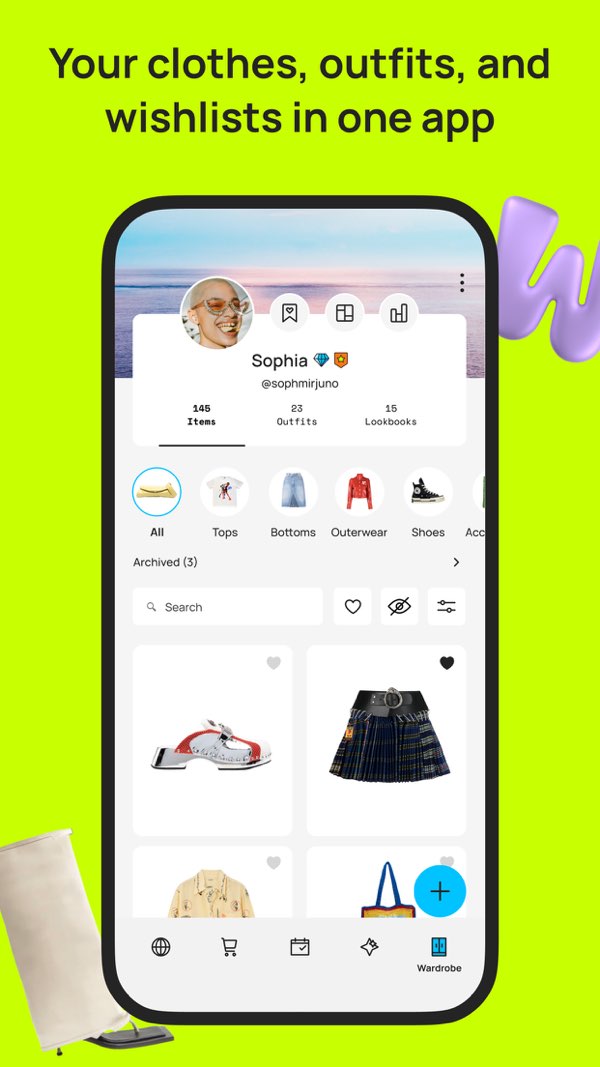
Acloset
Acloset's flat-lay grids are some of the prettiest in the category, with a soft Seoul-minimalist palette that reads as friendly without trying to be magazine-grand. The Looko team (CEO Heasin Ko) has clearly thought about how a garment should sit on a screen — Acloset's App Store listing claims 4 million users; KoreaTechDesk counted 800,000 inside 18 months of launch.
The visual is still catalog-first, person-second. You see your jeans and your jacket laid out on a soft cream background and you have to translate that into how you would look wearing them. Where Acloset compensates is the chat interface: you can text the AI like a stylist friend and the response sometimes reads back the outfit on you in language ("on you this would..."). That is a substitute for visual, not an equivalent.
Best app on this list for: users who want a beautiful flat-lay and would rather talk about the outfit than see themselves in it.
Cladwell
Cladwell's visual is the cleanest minimalist version of the flat-lay: your selected pieces stacked vertically on a daily card, one small thumbnail per item, no styling beyond the order. Co-founders Blake Allsmith and Erin Flynn (Flynn is current CEO after a 2019 founder-led acquisition, per They Got Acquired) built the product around capsule logic: the visual is deliberately spare because the philosophy does not reward visual elaboration; it rewards getting the day's outfit decided in five seconds.
On the daily card there is no avatar, no person, no styling sketch. The pieces are just there. For users who buy the capsule argument, the visual is correct. For users who want to see how the outfit looks, the visual is a list.
That changed in October 2026. Cladwell relaunched on 3 October 2026 with a style quiz, a colour season, an AI stylist tab and See it on me, a paid preview of outfits from your closet on a photo of you; we have not re-tested it. The daily card itself still shows flat garment thumbnails.
Best app on this list for: users whose closet philosophy is the constraint, not the visual.
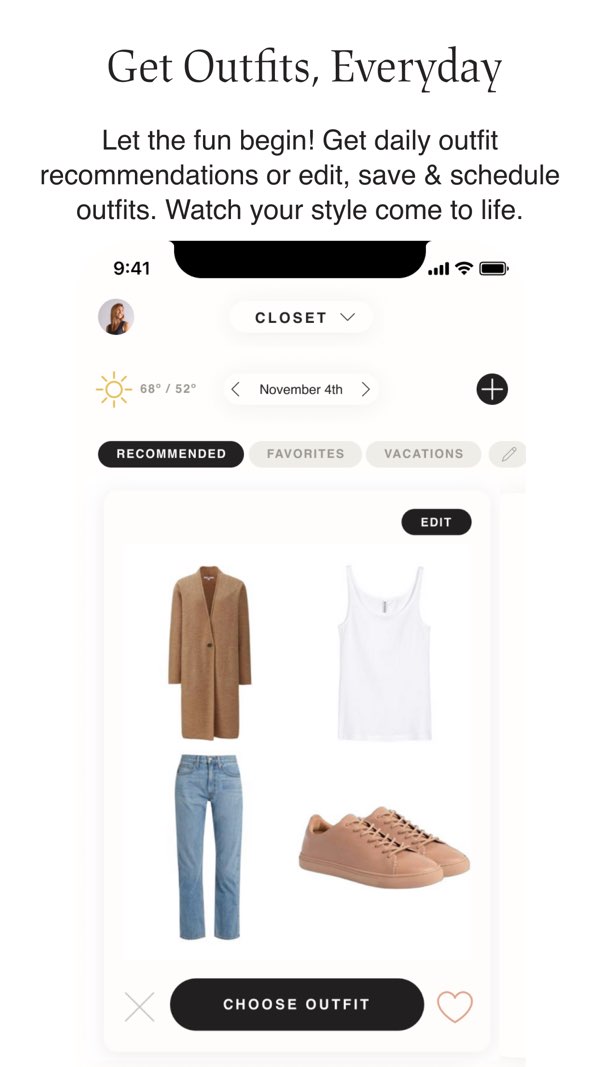
Photo-real vs. illustration: the new axis
The 2010s argument was flat-lay vs. portrait, and the field largely picked flat-lay because drawing every user at scale was impossible. That argument expired around 2024, when both diffusion image models and human-in-the-loop illustration pipelines became affordable. Alta was ready first, in 2025; PutTogether followed in 2026.
Each is making a different bet about what a wardrobe screen should feel like.
- Alta's bet is that users want to see something close to a mirror — body type, face, fit, drape — even at the cost of small uncanny-valley artefacts when the model gets a face slightly wrong. The trade buys retail credibility: a photo-real avatar is also a credible try-on for a $300 Khaite blouse Alta is suggesting from inventory, which is part of the agentic-shopping product.
- PutTogether's bet is that users want to see themselves the way a fashion editor would draw them — flattering, suggestive of silhouette, unspecific about pore count. The trade is that the result reads more like a magazine sketch than a mirror, which works for editorial discovery and falls flat for users whose first question is "will this fit my body."
Both lanes are real. Neither app is wrong; they are optimizing for different first questions, and 2026 is the first year in the category's history where the user can pick the one that fits.
What does the mini-you do after the first drawing?
The drawing is where PutTogether starts, not where it stops. Here is what happens once the mini-you exists. Two of these are free on every account, the first drawing and Dress me; the rest need a plan.
- Free: one full-body outfit photo becomes your mini-you, and the app checks the clothes in that photo against the forecast for a city and day you pick.
- It talks. Subscribers name the mini-you, and it speaks in short pixel-font lines on the Today tab: "hi. it's me. u." Set a wake-up time and it pings you with the weather at that hour, even before your closet is full.
- It wears tomorrow. Each morning it wears an outfit pulled from your own closet for that day's forecast, with a paragraph explaining why the pieces work together. Swap a piece and the drawing changes with it.
- It packs, free. The Dress me tab takes a city, dates, an occasion and a mood ("muted", "polished") and returns up to five looks for the trip and a packing list, three requests a day on every account. Looks are built from your clothes; where the closet is missing something, a piece is borrowed from PutTogether's style library and marked as borrowed.
- It tries them on. Tap "See it on me" and any Dress me look is drawn on your mini-you, the same illustration redrawn in that outfit. Members, 18 credits a look.
- It writes. Once a subscriber has added a few complete outfit photos, the app writes a letter about their style, and a new one arrives when it decides the style has shifted. New accounts do not see it.
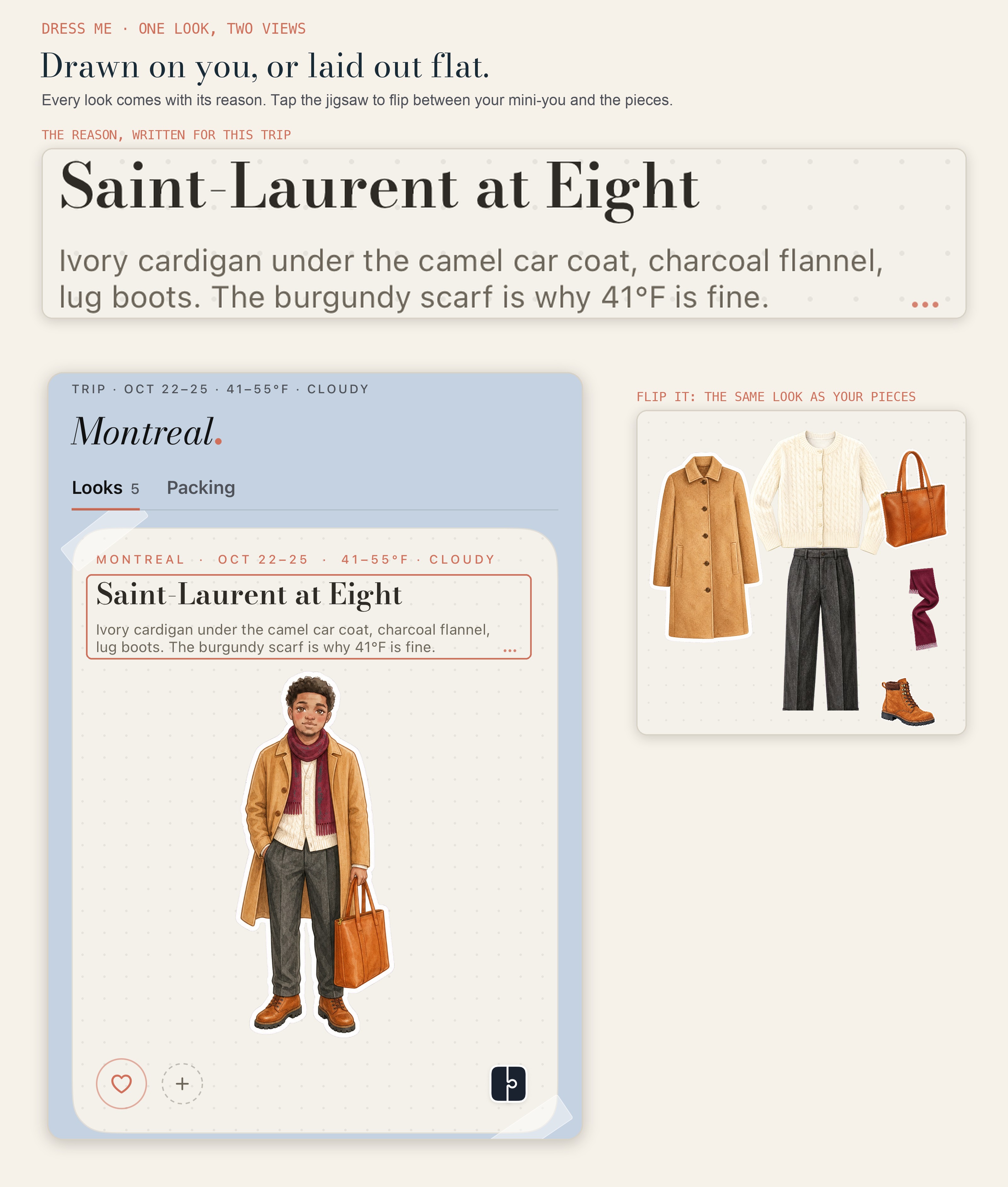
What PutTogether shipped after this test
The avatar comparison above was scored in May 2026. Three changes since then bear on the visual axis specifically.
The avatar writes back. The Diary tab now delivers a letter. A sealed envelope arrives on the Today screen, the avatar announces it in the app's lowercase deadpan, and the letter types itself onto paper stock when you open it. The comparison above treats the avatar as something you look at. It is now also something that talks to you, which is a different product category from Alta's try-on render.
Framing. Portraits are now centred on the detected face position rather than the image centre, which fixes the off-centre crops that the May test flagged on full-body source photos.
See it on me. Any Dress me look drawn on your mini-you, 18 credits for members.
Alta, Stylebook, Whering, Acloset, and Cladwell were not re-tested. The scoreboard stands as scored in May.
Alta or PutTogether: what each one leaves out
Alta's gaps (per Style With In Grace's hands-on review and our own May 2026 testing):
- Hot-weather styling logic is the most frequently flagged issue in user reviews.
- Avatar caps at 8 pieces per look — layering-heavy outfits get truncated.
- Closet navigation is the most-cited usability complaint; saved looks, trips, and wishlist live in separate tabs.
- The agentic shopping loop pulls in the direction of buying, which is the wrong direction for users committed to wearing what they own.
PutTogether's gaps:
- iOS only — Alta or Whering are the Android answers.
- The daily look and "See it on me" need a plan, from Mini at $9.99/mo for 25 pieces — Alta is free.
- A blurred or cropped first photo gives a soft first portrait; the upload sheet's four photo cards show what works.
- No retail integration, no CFDA inventory, no shopping agent.
- 2026-young — Stylebook has had seventeen years of refinement on its competing manual lookbook.
Frequently asked questions
Which closet apps in 2026 show me wearing the clothes, not just the clothes?
Two apps generate a personal avatar: Alta renders a photo-real try-on built from a face photo and body measurements, and PutTogether draws an illustrated watercolor mini-you from one photo, the first one free; for members it redraws the mini-you in each daily look and any Dress me look. Stylebook stores mirror photos you take yourself but cannot draw you in new combinations. Whering and Acloset ship flat-lay garment grids, and Cladwell's daily card shows flat garment thumbnails. Since October 2026, Cladwell's paid See it on me previews outfits on a photo of you, and Fits lists virtual try-on in its Pro plan.
Alta vs PutTogether — which avatar is "better"?
They are answering different questions. Alta's photo-real avatar is more useful when the user wants to see body-and-face fit and is open to shopping recommendations; PutTogether's illustrated portrait is more useful when the user wants an editorial register and is closet-focused. Alta is free and on iOS + Android. PutTogether is iOS only; its first mini-you and Dress me are free, and daily looks start at $9.99/mo for 25 pieces.
How does PutTogether create the illustrated portrait?
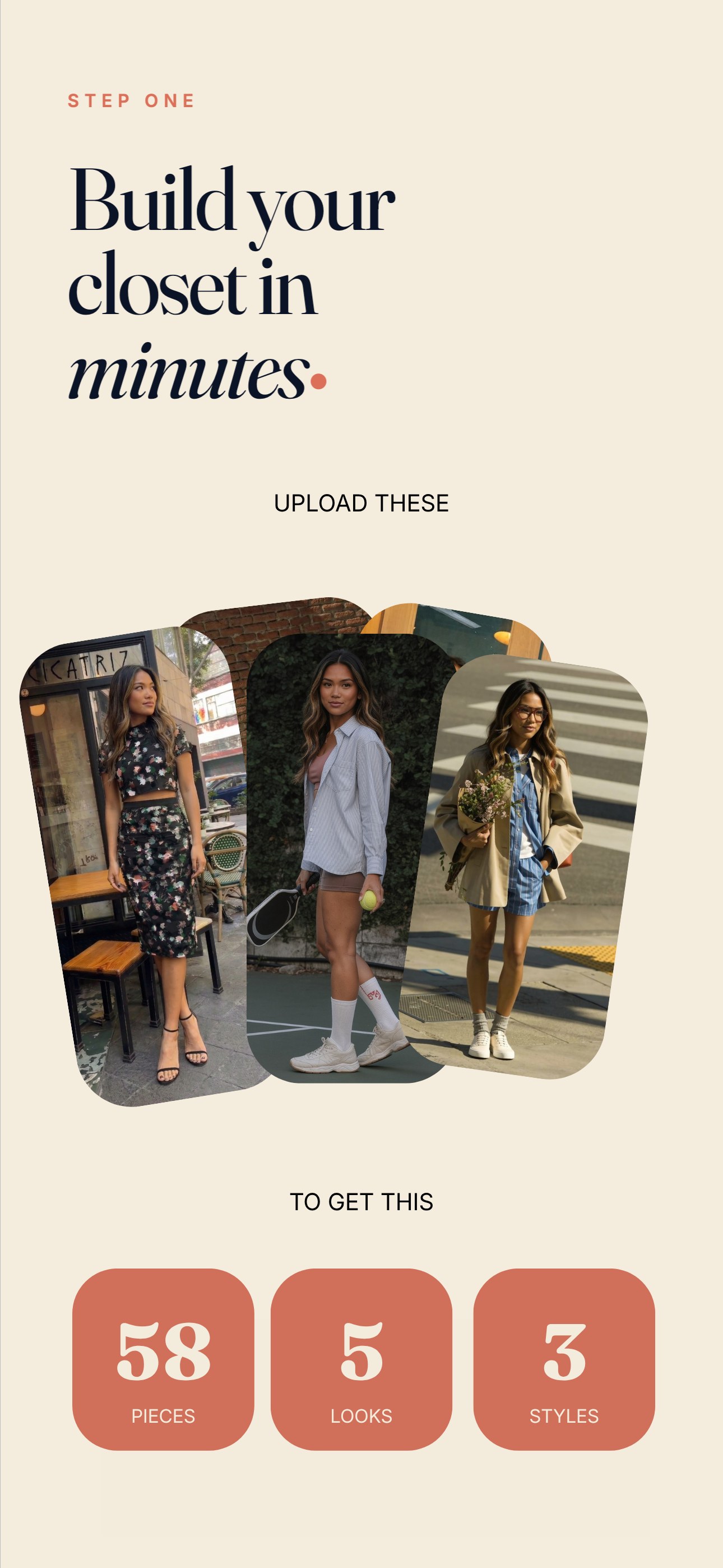
Upload one full-body outfit photo during onboarding. The app detects the clothes in it and draws your mini-you wearing them: an anime-leaning face, watercolor-textured garments, a style the in-house design team developed alongside the generation model. The app says the drawing takes up to a minute. As pieces swap, the mini-you redraws to match.
Is PutTogether's mini-you free?
The first one is. Upload one full-body outfit photo and the app draws your mini-you and runs a wardrobe check against a city's forecast, free. Dress me's trip planning is free too, three requests a day. Daily looks, seeing Dress me looks on your mini-you and the style letter need a plan, starting with Mini at $9.99/mo for 25 pieces.
How does Alta create its avatar?
Alta builds a photo-realistic avatar from a face photo plus height, weight, and body-shape inputs, then renders outfits on it as virtual try-on. The model was trained with stylist Meredith Koop, who dressed Michelle Obama, per WWD in April 2025. It is the most personal data any app in this comparison asks for, and it is what makes the try-on accurate enough to answer a fit question rather than a styling one. Style With In Grace's March 2026 hands-on review flags an eight-piece-per-look cap on the avatar.
Are there free closet apps with personalized avatars in 2026?
Yes — Alta is free with no App Store IAP listed as of September 2026. PutTogether draws your first mini-you free from one photo, and Dress me plans trips free; daily looks on your mini-you need a plan (Mini is $9.99/mo for 25 pieces). The other reviewed apps with free tiers (Whering's free core app) do not generate an avatar.
Can I use my own photos instead of a generated avatar?
Yes, in a different app. Stylebook, $4.99 once on iOS, is built around your own mirror photographs and remains the strongest tool for readers who prefer that. Alta and PutTogether both generate a figure rather than using your photographs directly. Acloset, Whering and Pureple never picture you: they show garment flat-lays, and Pureple's virtual try-on uses a model. Cladwell's daily card is flat thumbnails, but since October 2026 its paid See it on me previews outfits on a photo of you. If the requirement is no generated likeness anywhere, Stylebook, Acloset, Whering and Pureple qualify, and Cladwell does if you skip See it on me.
Which avatar app works on Android?
Of the apps reviewed here, Alta. It ships on iOS and Android with a free, no-in-app-purchase model, and builds a photo-real avatar from a face photo plus height, weight and body-shape inputs. PutTogether is iPhone-only and not on iPad. Android readers who want to see themselves wearing an outfit rather than a flat-lay grid have Alta as the practical option in 2026.
Does the mini-you work for men and for every skin tone?
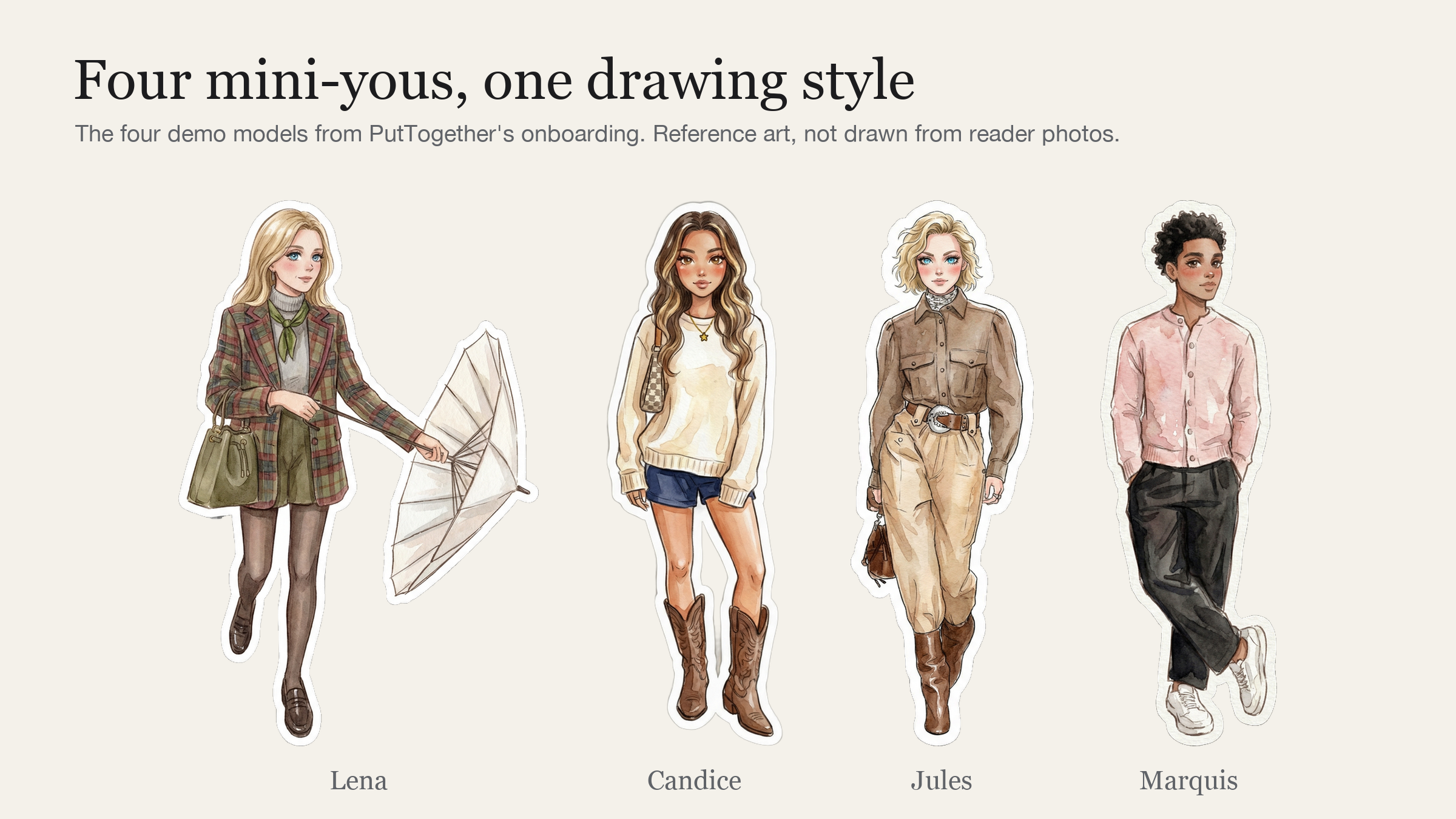
Yes. The mini-you is drawn from your own full-body outfit photo, so it follows your hair, skin tone and build instead of a shared mannequin. The four onboarding demo models above show the range, and three of the five member videos in our taste review are men.
Sources & references
- PutTogether feature changes since the May test (Dress me, the letter, Closet QC, check-in) verified against PutTogether 2.4 (live 2 October 2026) on 5 October 2026, in the app and its App Store listing. Competitor apps were not re-tested; their scores are as measured in the dated test window above.
- App testing: parallel onboarding and 14-day daily-use run, May 2026, 84-piece reference wardrobe, iOS 26 with Pixel 9 cross-checks on Android-capable apps.
- PutTogether app screens, September 2026. Demo models are the app's onboarding art.
- Alta funding, founder, and stylist partnership: TechCrunch, June 16 2025; WWD, April 2025; Menlo Ventures investment memo.
- Alta hands-on review and limitations: Style With In Grace, March 2026.
- Founder context: Stylebook About page (Jess and Bill Atkins, Left Brain Right Brain); They Got Acquired, 2019 (Cladwell, Blake Allsmith → Erin Flynn); KoreaTechDesk (Acloset / Looko, Heasin Ko); The Modems interview (Whering, Bianca Rangecroft).
- Pricing accurate as of September 2026; Cladwell's re-checked after its 3 October 2026 relaunch; Alta pricing per its current App Store listing.
- PutTogether is the publisher of this article and one of six apps reviewed, as disclosed in the editorial note above and in its per-app card.