Published by PutTogether, which makes one of the six apps below. No affiliate links. Every app was timed on iOS 26 in May 2026 against a 50-piece reference wardrobe, each setup run three times.
Scope: setup speed only. What each app costs once you are set up is in What Closet Apps Actually Cost, and the full ten-app field map is Every Digital Closet App in 2026, Ranked.
The setup is why people give up on closet apps. Most users underestimate how long photographing 50 pieces of clothing takes, and an app that asks them to do it on a Saturday loses them by Sunday.
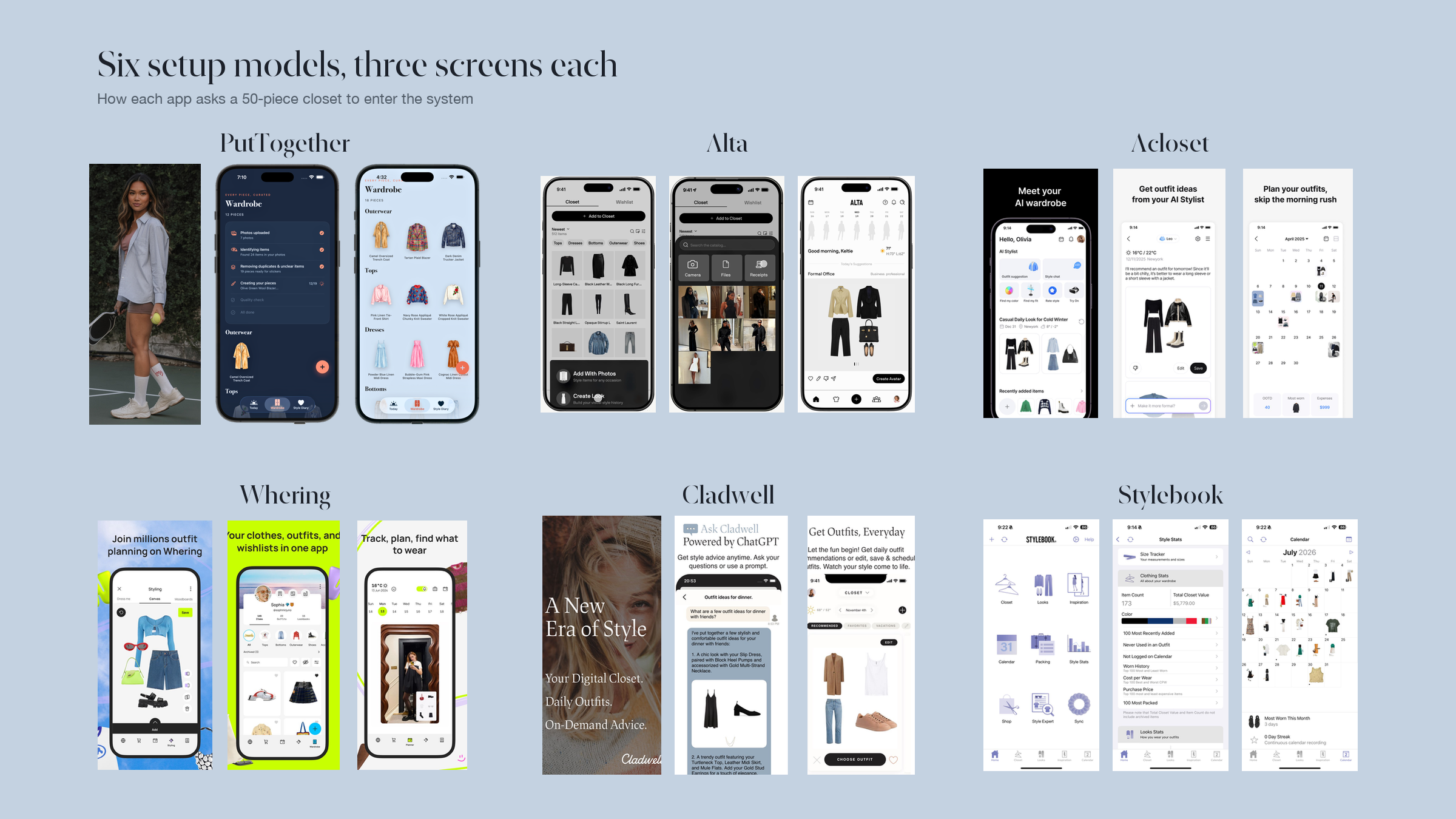
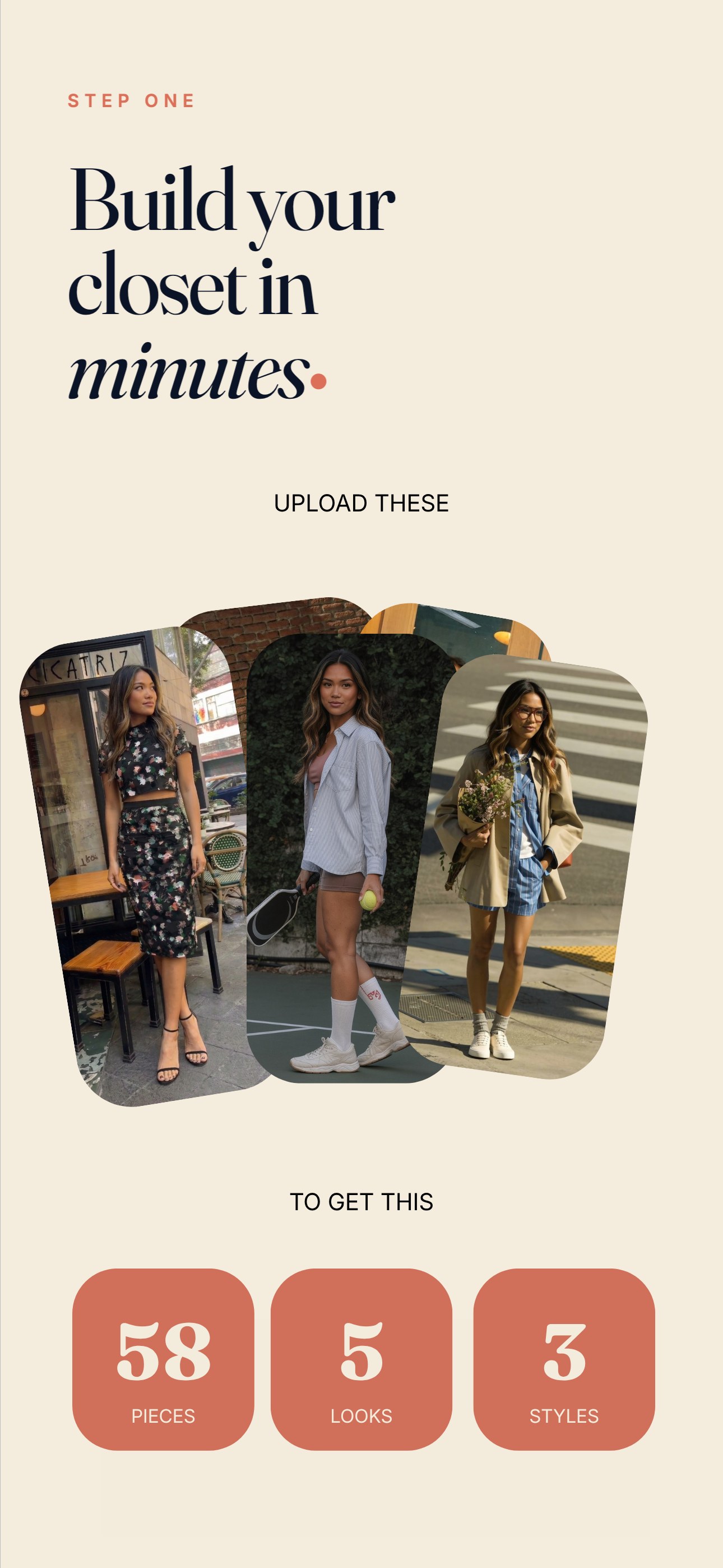
The category has known this for years. What changed in 2024–2026 is that two apps stopped asking the user to photograph pieces one at a time.  PutTogether extracts every garment in an outfit from a single full-look photo.
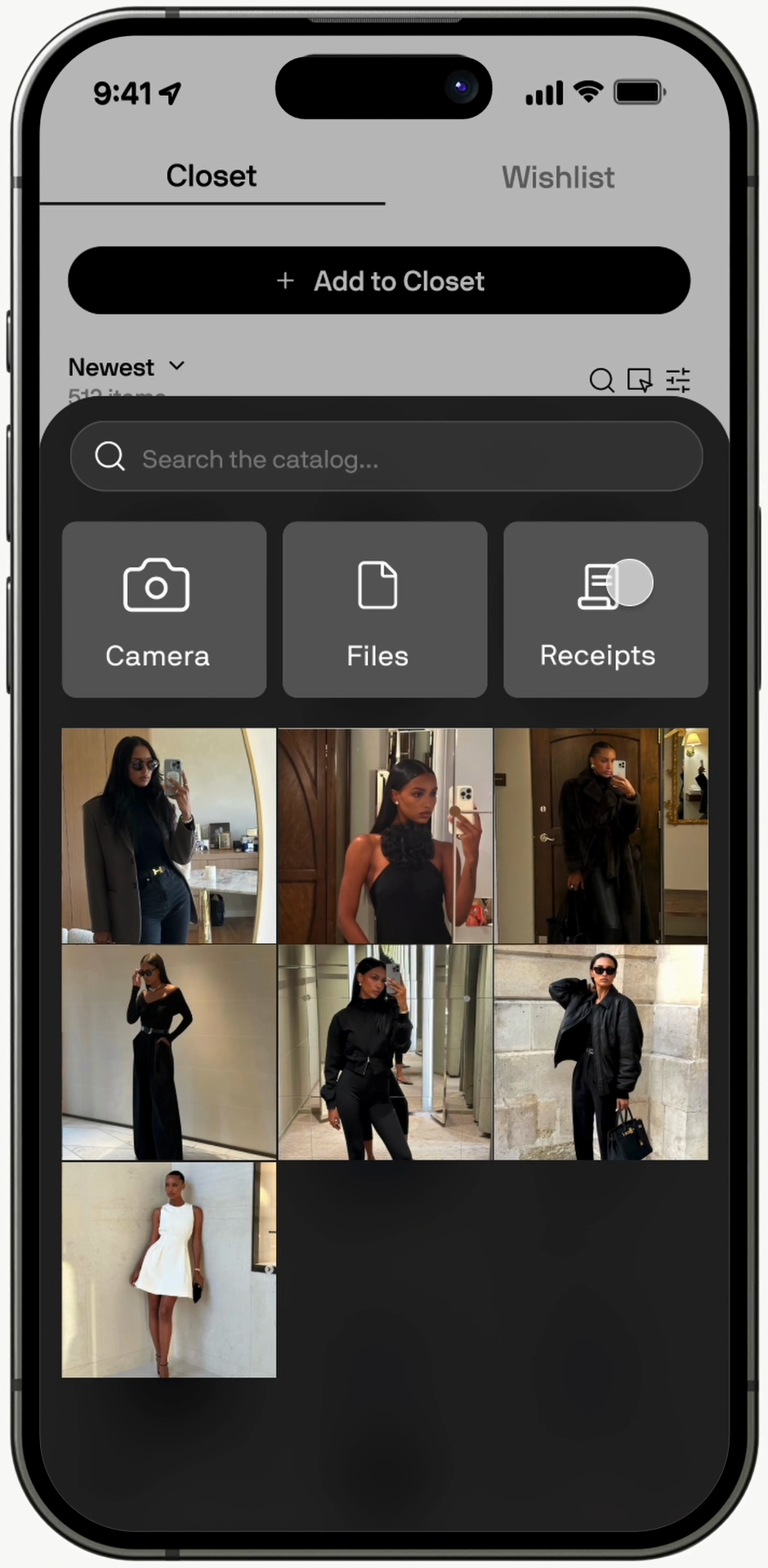
  Alta lets the user forward purchase-confirmation emails so anything bought online from one of ~4,000 partner retailers shows up in the closet without a camera ever opening. The other four reviewed apps still ship the 2010s model — one camera tap, one garment, one upload, repeat.
How we measured
Four criteria, each scored 0 to 10. Same 50-piece test wardrobe across all six apps, May 2026, on iOS 26. We ran each app's setup three times — once cold, once with a screenful of muscle memory, once timed — and used the median.
- Time to digitize 50 pieces. Wall-clock minutes from app install to a full 50-item wardrobe, using the app's recommended upload path.
- Upload model intelligence. Does the app extract pieces from outfit photos, auto-import from external sources, or require single-garment shots?
- Auto-categorization accuracy. Of the first 50 pieces, how many were correctly tagged (category, color) without manual editing?
- Time to first useful day. From app install to the moment the app suggests a wearable outfit from the user's own pieces.
What we couldn't test: Alta's effective speed depends on the user's shopping history with its partner retailers; our test wardrobe was 40% online-purchased from supported brands, which lands Alta in the middle of its range. A heavily online-shopped wardrobe would push Alta closer to PutTogether's 25-minute mark. We did not test bulk-CSV imports or any enterprise/styling-pro tiers.
The 2026 scoreboard
| Rank | App | 50-Piece Setup | Upload Model | Auto-Categorization | First Outfit |
|---|---|---|---|---|---|
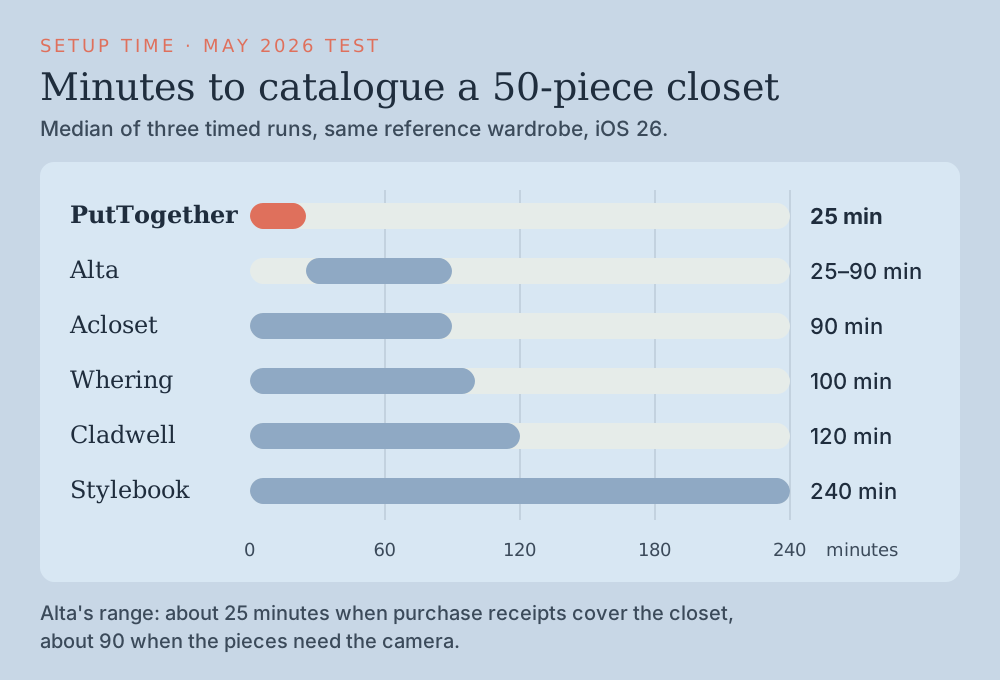
| 1 | PutTogether | ~25 min | Multi-piece outfit-photo extraction | High | Same day |
| 2 | Alta | ~25–90 min* | Email receipt import + snap + brand DB | High | Same day |
| 3 |  Acloset Acloset | ~90 min | Single-piece, fastest AI in field | High | Same day |
| 4 |  Whering Whering | ~100 min | Single-piece, design-strong | High | Same day |
| 5 |  Cladwell Cladwell | ~120 min | Single-piece, capsule-gated | Partial | Same day |
| 6 |  Stylebook Stylebook | ~240 min | Fully manual, no AI | Manual | Several days |
*Alta's range tracks the share of the wardrobe purchased online at supported retailers. Heavily online-shopped: ~25 min. Mostly thrift- or in-person-shopped: ~90 min, equivalent to Acloset.
The single-photo upload is not a clever feature. It is a re-framing of what the user is doing. The user is not "digitizing pieces"; the user is "showing the app outfits they wear," or "letting the app read the receipts the user already has." One is busywork, the other is a Sunday afternoon already lived.
The apps, one by one
PutTogether
PutTogether is the publisher of this article. With that on the table: it ranks first on this specific axis because the criterion is wall-clock time from install to a full 50-piece wardrobe, and the multi-piece outfit-photo extraction is the fastest path the category currently offers.
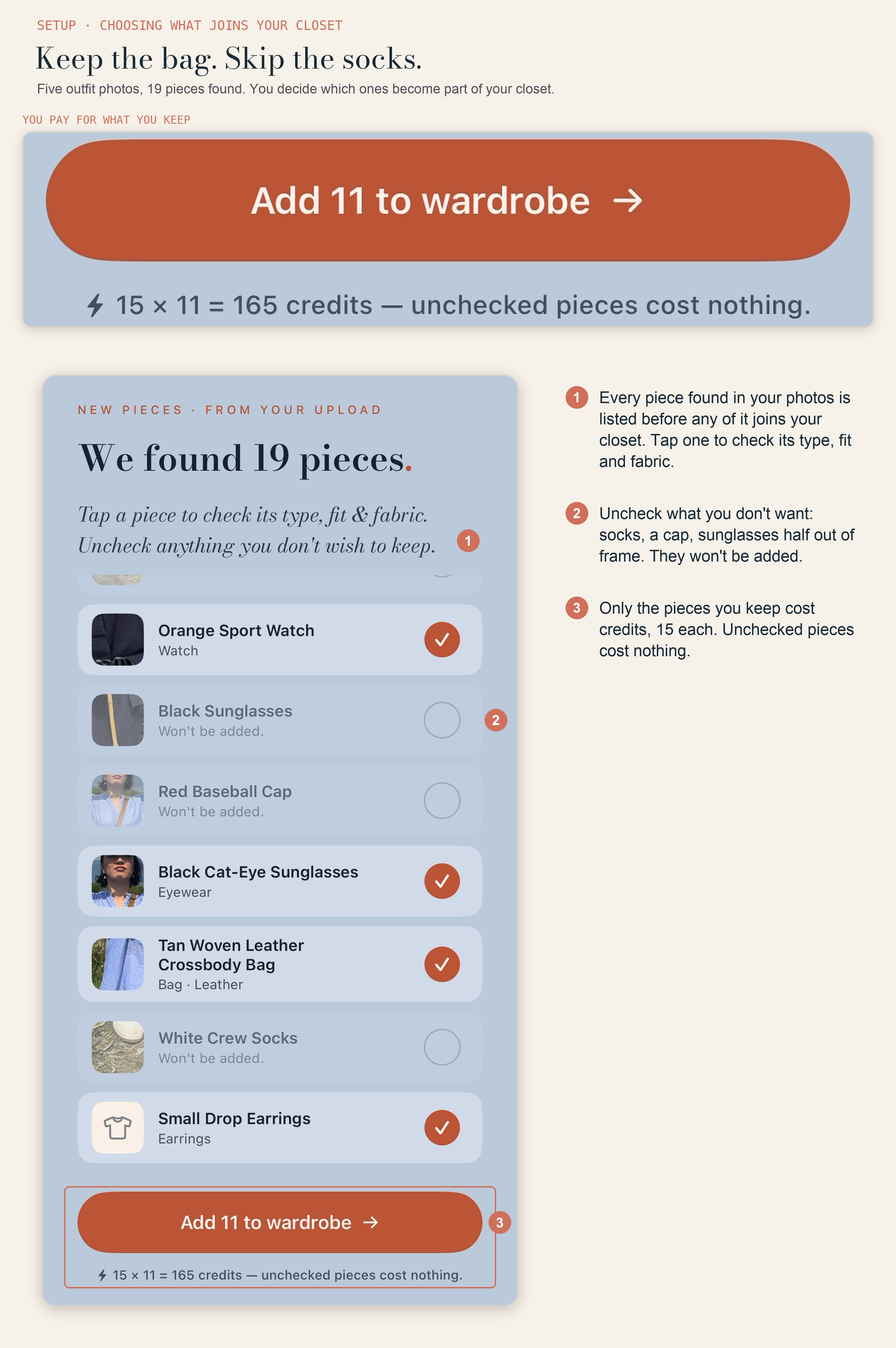
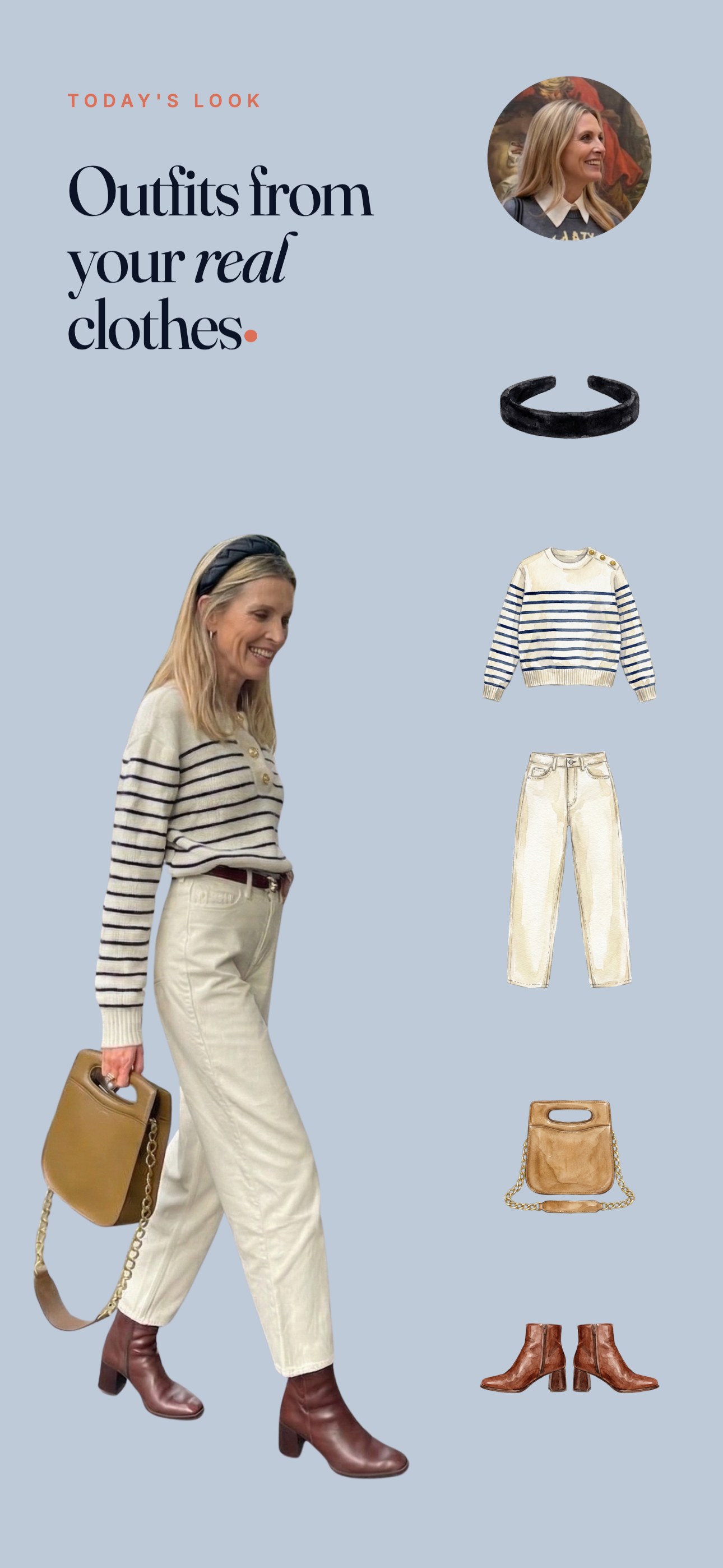
The flow: upload outfit photos and the app finds every garment in the frame (coat, top, trousers, shoes, bag). Before any of it joins your closet, Piece Check lists what it found. Tap a piece to check its type, fit and fabric; uncheck anything you don't want, like socks or sunglasses half out of frame, and it won't be added. The pieces you keep lose their backgrounds, get drawn as stickers and are filed by category. Five to eight outfit photos populate a typical 50-piece wardrobe.
Where it falls short on this axis:
- For users whose wardrobe is mostly bought online from major retailers, Alta's email-import path can be faster — the user forwards 30 receipt emails over a coffee and the closet populates without a camera opening at all.
- iOS only — Android users have Alta, Acloset, Whering, or Cladwell.
- The onboarding mini-you and wardrobe check are free, and draw up to three pieces from your first photo; a full closet needs a plan, from Mini at $9.99/mo for 25 pieces. Pureple, Alta, and OpenWardrobe are the free answers in the category at large (Pureple and OpenWardrobe omitted from this six-app review for setup-speed irrelevance).
- No tagging depth comparable to the fields Stylebook has built over seventeen years (brand, store, season, last-worn, cost-per-wear). PT's wardrobe is for outfit-making, not archival.
Best app on this list for: users whose actual blocker is "I'll get to it Saturday."
Alta
Alta is the only app in this review with email auto-import, and it offers three paths into the wardrobe: snap a photo (AI identifies the piece), forward a purchase-confirmation email (the system auto-pulls product imagery from the retailer's catalog), or pick from Alta's brand database covering ~4,000 partner brands and ~370 CFDA designers (WWD, April 2025). For users with a credit-card-and-email shopping habit, the email-import path is the fastest setup the category offers, period.
Founder Jenny Wang (28 at the time of the June 2025 raise, Harvard engineering, ex-DoorDash) raised an $11M seed in June 2025 led by Menlo Ventures with Anthropic's Anthology fund and LVMH-linked Aglaé Ventures (TechCrunch, June 16 2025). The system was trained with stylist Meredith Koop (Michelle Obama's longtime stylist).
Where it scored: Top on import-model breadth (the only app in this review with email auto-import), top on price (it's free), top on platform breadth (iOS + Android + web sign-in). Limitations reviewers have flagged: closet navigation is the most-cited pain point with saved looks, trips, and wishlist scattered across tabs (Style With In Grace, hands-on review, 16 March 2026: "The closet navigation is probably the biggest ongoing pain point"); avatar caps at 8 pieces per look; the app can be slow; the email-import path doesn't help for thrift, vintage, or in-person purchases. Alta also caps at one image per piece (Fits-app comparison, May 2025), so deeply textural items can't be re-photographed from a second angle.
Best app on this list for: users whose wardrobe is mostly bought online at major retailers and who want the closet populated without opening the camera.
Acloset
Acloset is the fastest single-garment app on this list. The Looko team's AI is the best in the category at recognizing pieces from a single photo, removing backgrounds in under two seconds, and proposing the right category on the first try. The interface is one of the friendliest in the category, with a soft Seoul-minimalist tone.
The reason Acloset finishes third on this article's specific axis is that the model is still piece-by-piece. A 50-piece wardrobe requires 50 separate photographs. Even at 90 seconds per piece, the math is unforgiving for deeper closets.
Best app on this list for: Android users who don't qualify for Alta's email-import path (thrift- or in-person-heavy wardrobes) and want the fastest possible single-piece flow.
Whering
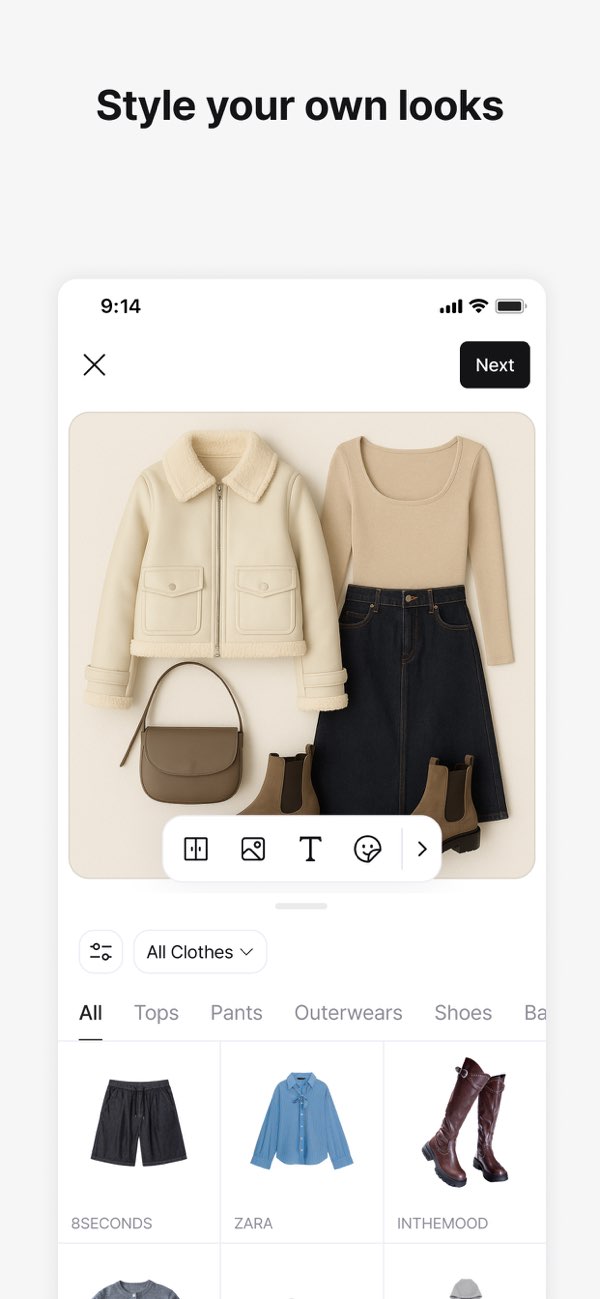
Whering's upload UX is the prettiest in the category. CEO Bianca Rangecroft (ex-Goldman Sachs) has publicly described Whering as a Clueless-inspired digital wardrobe (The Modems interview), and the upload screens reflect that magazine-editorial sensibility. Every step is art-directed.
The model is still single-piece. The team has been candid that the constraint is deliberate: pretty wardrobes require pretty pieces, which require pretty photos, which are easier to art-direct one at a time. The result is a wardrobe that looks like a magazine, after 100 minutes of work.
Best app on this list for: users whose closet app doubles as an aesthetic project and who don't mind spending the time.
Cladwell
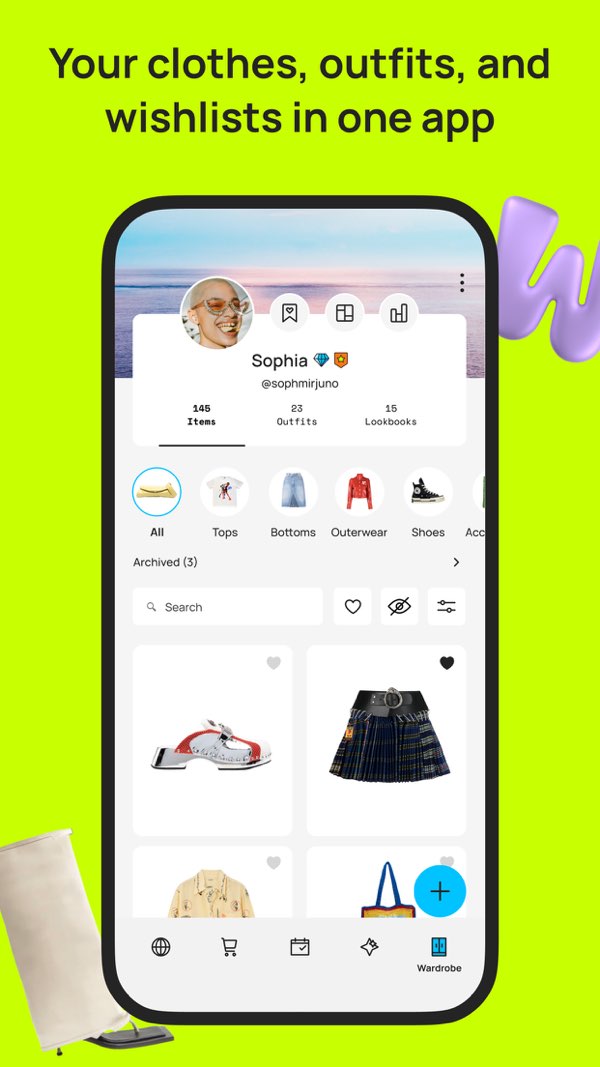
Cladwell's slow setup is a feature, not a bug. Co-founder Blake Allsmith built the original product around capsule logic — a smaller wardrobe rotated daily — and Erin Flynn (current CEO after a 2019 founder-led acquisition, per They Got Acquired) has kept the same constraint: the manual upload is the gate that forces users to confront the right-sized-closet ceiling. If you spend two hours uploading 200 items, the app's view is that you have done the wrong thing.
For users who buy the capsule argument, this is the right friction. For users who already own 300 items and want them visible, it is the wrong app.
Cladwell relaunched on 3 October 2026 with a style quiz, a colour season, an AI stylist tab and See it on me (outfits previewed on a photo of you). The relaunch also lists browsing similar pieces as a faster add path; we have not re-timed it.
Best app on this list for: users whose closet philosophy is the constraint, not the visual.
Stylebook
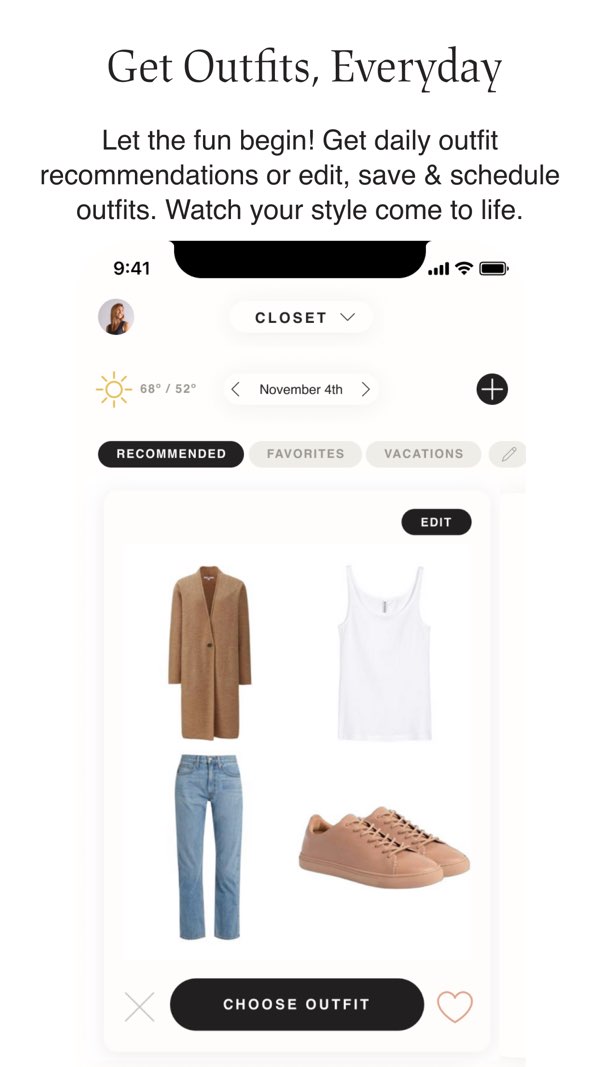
Stylebook is the slowest setup on this list by design. The app is built around the user's own mirror photos, tagged manually, with the user doing the background work using in-app tools. Co-founders Jess Atkins (who started in the fashion closets at Vogue and Modern Bride) and Bill Atkins have framed this consistently as a deliberate choice for over 15 years: the app gives tools to catalog and plan, not opinions about what to wear.
A complete 50-piece Stylebook closet takes about four hours of disciplined work, and the reward is the most detailed personal catalog any 2026 app offers. The connoisseur's answer; the wrong app for setup-speed-anxiety.
Best app on this list for: users who treat the closet app as a long-term archive and find the work itself satisfying.
Three import models, one trade-off each
The 2026 field finally separates on the upload axis. Each model has a real trade-off; the right one depends on the user's situation.
- Multi-piece outfit-photo extraction (PutTogether). Fastest for users who'll stand in front of a mirror in five different outfits. Fails for items the user doesn't have a full-look photo of (the cocktail dress worn once two years ago). You pick which detected pieces join the closet, so a stray sock never becomes a sticker.
- Email auto-import (Alta). Fastest for users with a credit-card-and-Gmail shopping habit at supported retailers. Useless for thrift, vintage, hand-me-downs, gifts, or items bought from retailers Alta doesn't partner with. Free, no camera required.
- Single-piece AI (Acloset, Whering, Cladwell). Reliable but slow at scale. Acloset's AI is the fastest of this lane; Whering is the prettiest; Cladwell's pace is on purpose.
- Manual (Stylebook). Slowest by design, deepest catalog as the reward.
What PutTogether shipped after this setup test
The stopwatch numbers above were taken in May 2026 against a 50-piece wardrobe. The setup path has changed since, in ways that affect what happens before and after the timer stops.
You choose what joins the closet. Piece Check now lists every garment the app found across your photos before any of it is added. Tap one to check its type, fit and fabric. Uncheck what you don't want, a pair of socks or sunglasses half out of frame, and it won't be added. Only the pieces you keep cost credits: 15 each, and "unchecked pieces cost nothing," in the app's own words.
Closet QC. Extraction misreads things. A shadow becomes a second garment, a folded sleeve becomes a vest. The app now collects those in a Needs Attention view and walks you through keeping, renaming, or removing each one, so a bad crop stops feeding every outfit built afterwards. The May test measured time-to-catalog and said nothing about time-to-correct, which is the number that actually decides whether you keep using a closet app.
Duplicate merging. The same garment photographed across several outfit shots now merges into one wardrobe entry instead of three.
A guided first step. The upload sheet opens on four numbered cards showing what makes a usable photo.
The five other apps were not re-timed. The table above stands as measured in May.
Frequently asked questions
Which closet app has the fastest setup in 2026?
It depends on the user's existing data. PutTogether is fastest for users willing to take a handful of outfit mirror photos — about 25 minutes for a 50-piece wardrobe via multi-piece extraction. Alta is fastest for users with a heavy online-shopping history at supported retailers, since forwarding purchase-confirmation emails skips the camera entirely. Acloset is the fastest single-piece option at about 90 minutes.
How accurate is PutTogether's outfit-photo extraction?
You check every piece before it counts. After an upload, PutTogether's Piece Check lists each garment it found across your photos. Tap one to correct its type, fit and fabric, and uncheck anything you don't want, like socks or sunglasses half out of frame. Only the pieces you keep join the closet, at 15 credits each; unchecked pieces cost nothing.
How does Alta's email-receipt import work?
Users forward purchase-confirmation emails from supported retailers to a dedicated address. Alta's system reads the receipt, identifies the product against the retailer's catalog, and adds the item to the closet using the retailer's official product imagery. The path covers ~4,000 partner brands and ~370 CFDA designers (WWD, April 2025); items bought from non-partner sources still need a manual or photo path.
Can I upload pieces from photos I already have on my phone?
Yes — every app on this list accepts camera-roll uploads. What differs is how many garments one photograph can carry. PutTogether extracts multiple pieces from a single outfit photo, so five to eight photographs cover a 50-piece wardrobe. Acloset, Whering, Cladwell and Stylebook expect one garment per image, which is why the same wardrobe takes an evening rather than half an hour.
Does the app remove the background automatically?
PutTogether, Alta, Acloset, Whering and Fits all do automatic background removal, and Acloset's is the fastest in the field at under two seconds per garment. Stylebook provides cropping tools and expects you to do the work, which is part of why its setup is the slowest here. Cladwell handles standard uploads well and struggles with busy backgrounds.
What about a 200-piece wardrobe?
PutTogether handles a 200-piece wardrobe in under an hour via roughly 40 outfit photos; a 200-piece closet is the Atelier tier, $34.99/mo. Alta can match that pace for users whose wardrobe is heavily online-purchased through partner retailers, since the email-import path scales linearly with email forwarding. Cladwell's capsule philosophy is designed against closets that large. Stylebook is possible but will take a full weekend.
Is there a free closet app with bulk upload?
Yes, but with the trade-off above — Alta is free and offers email-receipt auto-import for supported retailers. For users who can use that path, it's the fastest free setup in the category. PutTogether extracts up to three pieces from your first outfit photo free; the rest of the closet needs a plan.
Sources & references
- PutTogether feature changes since the May test (Dress me, the letter, Closet QC, check-in) verified against PutTogether 2.4 (live 2 October 2026) on 5 October 2026, in the app and its App Store listing. Competitor apps were not re-tested; their scores are as measured in the dated test window above.
- App testing: editorial setup-speed runs, May 2026, 50-piece reference wardrobe (40% online-purchased from supported retailers), iOS 26, each setup run three times.
- Alta funding, founder, and stylist partnership: TechCrunch, June 16 2025; WWD, April 2025.
- Alta one-image-per-piece limit and hands-on critique: Style With In Grace, March 2026; Fits app comparison, May 2025.
- Founder context: Stylebook About page (Jess and Bill Atkins, Left Brain Right Brain); They Got Acquired, 2019 (Cladwell, Blake Allsmith → Erin Flynn); The Modems interview (Whering, Bianca Rangecroft); KoreaTechDesk (Acloset / Looko, Heasin Ko).
- Pricing accurate as of September 2026; Cladwell's re-checked after its 3 October 2026 relaunch; Alta pricing per its current App Store listing.
- PutTogether is the publisher of this article and one of six apps reviewed, as disclosed in the editorial note above and in its per-app card.